1
/
of
8
MOKiN
MOKiN USB C Docking Station 3 Monitors, 17-in-1 Triple Display Docking Station with 3 HDMI & 2 DP, 10G USB A/C, Gigabit Ethernet, 100W PD, Smart Display, SD/microSD, for Mac/Dell/Hp(Driver Required)
MOKiN USB C Docking Station 3 Monitors, 17-in-1 Triple Display Docking Station with 3 HDMI & 2 DP, 10G USB A/C, Gigabit Ethernet, 100W PD, Smart Display, SD/microSD, for Mac/Dell/Hp(Driver Required)
Regular price
$122.77 USD
Regular price
Sale price
$122.77 USD
Shipping calculated at checkout.
Quantity
Couldn't load pickup availability
About This
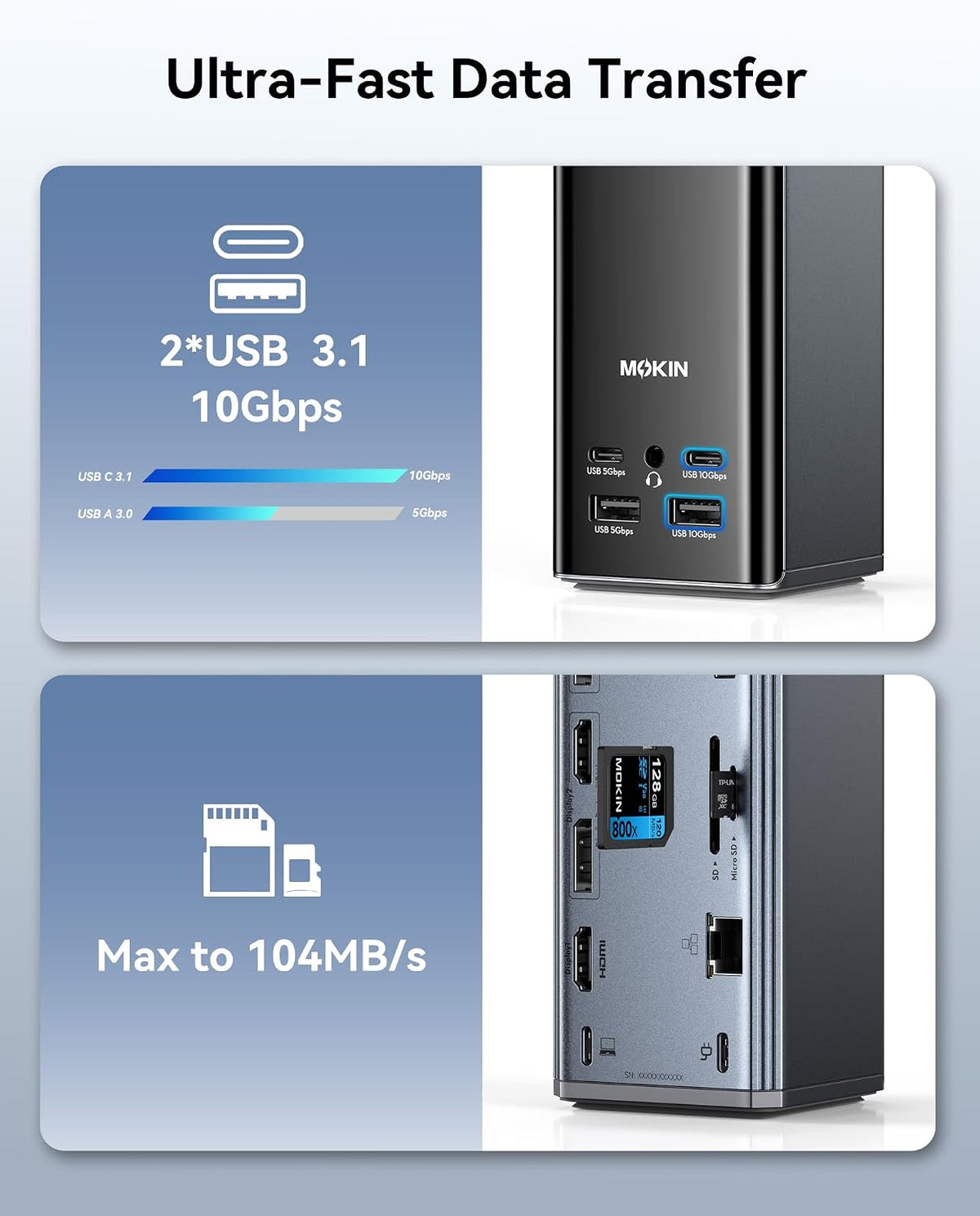
- [17-in-1 Professional Laptop Docking Station]: This all-in-one USB C Docking Station features 3 HDMI and 2 DisplayPort outputs, 2× 10 Gbps USB-C/A ports, 2× 5 Gbps USB-C/A ports, 2× USB 2.0 ports, 1Gbps Gigabit Ethernet, a 104 MB/s SD/microSD card reader, and a 3.5mm audio jack
- [Triple-Screen Dock]: Flexibly combine 3 HDMI ports + 2 DP ports to simultaneously extend three displays on Windows/macOS/Linux systems. This Docking Station 3 HDMI solves the issue that macOS does not natively support triple-screen displays, delivering 4K@60Hz video quality regardless of port configuration. (Flexible triple-screen setups: HDMI&DP&HDMI; HDMI&HDMI&HDMI; DP&DP&HDMI)
- [True Triple 4K Display for macOS and Windows]: Expand your screen space. This docking station 3 monitors supports up to three independent 4K@60Hz monitors on compatible macOS and Windows systems, delivering crisp, lag-free visuals—ideal for creative work, programming, trading, and multitasking. Connect via USB-C, USB4, or Thunderbolt for broad laptop compatibility. Note: The computer's USB-C port needs to support video output and plug-and-play functionality. You must download the driver first before using the video port
- [Smart LCD Digital Display & Screen Lock Button]: This MOKiN Laptop Docking Station features a built-in digital display that provides real-time feedback on charging power, resolution, and other information, allowing you to easily monitor connection status. The screen lock button protects sensitive information at any time. Its compact vertical design incorporates silicone suction cups on the base for worry-free, stable placement, redefining your workspace
- [10Gbps High-Speed Dock]: 2X 10Gbps USB-C/A + 2x USB-C/A (5G/480Mbps) + Gigabit Ethernet & Hi-Fi Audio. Multi-speed matrix supports gaming rigs & pro workflows. MOKiN docking station ensures a fast and secure transfer experience
- [PD 100W Fast Charging]: The USB C Docking Station PD port supports up to 100W power input, enabling up to 85W pass-through charging for laptops. We recommend using a power adapter rated at 87W or higher to ensure that all features function properly. *Note: Package includes only the product unit, user manual, and two cables. Charger not included. Ensure a 100W adapter is available to meet full-load charging requirements
Overview
- Brand : MOKiN
- Hardware Interface : DisplayPort, HDMI
- Compatible Devices : Laptops
- Total USB Ports : 6
- Number of Ports : 17
- Total HDMI Ports : 3
- Wattage : 100
- Number of Packs : 1
- Fulfill Your Multiple Needs
- Concentration and love are the core of our company, MOKiN is a professional hub business with 10 years of experience, the company has a strong R&D team and professional after-sales service, and will always provide you with support
- MOKiN's products are checked by professional and firm companies to ensure that each product is of high quality
- Does this MOKiN dock require any software or drivers to be downloaded?
- Yes. The DisplayLink software must be installed on both Windows and Mac computers.
- Which operating systems is this MOKiN dock compatible with?
- Windows 10 and later, macOS 11 and later (driver installation required), and Chrome OS 100 and later.
- How can I confirm that this MOKiN dock is compatible with my computer?
- This MOKiN dock is compatible with most modern computers running Windows, macOS, or ChromeOS that have an available USB-A or USB-C port.
- Does this dock support triple-display output on MacBook Neo, M1, M2, or M3 models?
- Yes. Thanks to DisplayLink technology, this MOKiN dock can connect to three displays (three 4K 60 Hz displays) even if the computer itself only supports a single video output. Mac devices require the DisplayLink Manager driver to be installed.
- Which USB-C port on the dock can be used to connect to a computer?
- Use the USB-C port marked with a computer icon to connect your computer to the dock. The other USB-C ports are intended only for external accessories and charging; they cannot be used to connect to a host device.
- MOKiN , a well-known and extremely professional 3C electronic brand, established in the year of 2011, who engaged in developing and creating various kinds of usb c hub multiport adapter and high-valued usb c docking stations, aims to provide the customers with much conveniences by extending more ports from your usb c laptops. which has been receiveing much pupularity overseas so far.
Share