1
/
of
8
SROMGEE
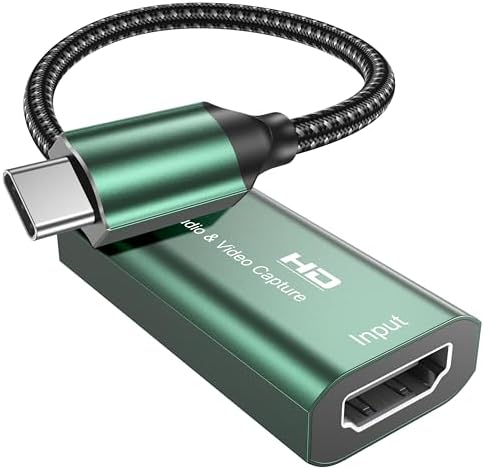
Video Capture Card,4K USB 3.0 HDMI to USB C Capture Card,1080P 60FPS Capture Card for Gaming, Streaming, Compatible with IPad Windows Mac OS Switch PS5/4 Xbox OBS Zoom DSLR Camera (Green)
Video Capture Card,4K USB 3.0 HDMI to USB C Capture Card,1080P 60FPS Capture Card for Gaming, Streaming, Compatible with IPad Windows Mac OS Switch PS5/4 Xbox OBS Zoom DSLR Camera (Green)
Regular price
$21.74 USD
Regular price
Sale price
$21.74 USD
Shipping calculated at checkout.
Quantity
Couldn't load pickup availability
About This
- 4K Input & 1080P 60FPS Capture This USB C video capture card takes 4K@30Hz HDMI input and records at 1080P@60FPS. Perfect for online capture, real-time recording, live gaming, video meetings, and more. Capture smooth, lag-free gameplay from your Switch, PS5, or Xbox with crisp visual quality. Note: For capture use only. Requires capture software (e.g., OBS) and is not designed for direct screen mirroring to a monitor or TV.
- Plug and Play & Easy to Carry No drivers or external power needed. Just connect your HDMI source and plug the USB C end into your computer or iPad – it's ready to go. The lightweight aluminum case fits easily in any bag. Great for outdoor streaming, game recording, video calls, or online teaching. Works with OBS, Zoom, Twitch, and YouTube.
- Wide Compatibility Works with Your Devices & Software – This HDMI to USB C video capture card is compatible with Windows, MAC OS, Android, and Linux. Use it with popular streaming and recording software like OBS Studio, Zoom, Twitch Studio, VLC, and more. It works seamlessly with PS4, PS5, Xbox, Nintendo Switch, DSLR cameras, camcorders, TV boxes, and any other HDMI-enabled device. Stream directly to YouTube, Twitch, Facebook Live, or use it for video calls and online meetings.
- Note Before recording, test your HDMI source (game console, camera, etc.) with a monitor to confirm video output. If you're using a tablet or phone, make sure OTG mode is turned on. For PS4 or PS5 users: if you see a black screen, disable HDCP in your console settings. Use a USB 3.0 port on your computer to ensure full bandwidth and stable 1080P 60FPS capture. The capture card works with common video formats like MJPEG and YUY2 – your software (OBS, Zoom, etc.) will handle the decoding automatically. If the device isn't detected, simply unplug and reconnect, then restart your capture software.
Overview
- Brand : SROMGEE
- Hardware Interface : HDMI, USB Type C
- Video Capture Resolution : 1080p
- Operating System : Android, Linux, Mac OS, Windows 7,8,10, Windows Vista
- Recommended Uses For Product : Video Recording, game recording, live broadcasting, online meeting
- Previous page
- USB 3.0 Transfer
- 1080P VS 720P
- 60fps vs 30fps
- Live Streaming Setup
- Video Conference Capture
- Platform Compatibility
Share