1
/
of
8
Techigher
VHS to Digital Converter & RCA to HDMI Adapter USB Video Capture for VCR/DVD/AV/PS2/Wii,av to hdmi to Display Output, wii hdmi Adapter,Save/Convert OldVideo (Software Required for Cap
VHS to Digital Converter & RCA to HDMI Adapter USB Video Capture for VCR/DVD/AV/PS2/Wii,av to hdmi to Display Output, wii hdmi Adapter,Save/Convert OldVideo (Software Required for Cap
Regular price
$52.35 USD
Regular price
Sale price
$52.35 USD
Shipping calculated at checkout.
Quantity
Couldn't load pickup availability
About This
- 2-in-1: vhs to digital converter & rca to hdmi converter! Digitize & Convert Simultaneously,Uniquely designed for both VHS to digital conversion and RCA to HDMI display output! Capture your old VHS tapes, VCRs, or PS2/Wii games to your computer via USB/Type-C port, while simultaneously viewing them in real-time on HDMI TVs/monitors. No need to buy separate devices—perfect for archiving family memories or retro gaming.
- USB-A & USB-C Dual Inputs for Universal Compatibility This VCR to digital converter Works with any computer! Connect via USB-A (for older PCs) or USB-C (for MacBook/Modern Laptops). Capture analog signals from VHS/DVD players, Hi8 cameras, or game consoles (PS2/Wii) and save them as MP4 files.
- Preserve Precious Memories in Digital Formats Rescue fading VHS tapes and convert them to digital files (1080p) for permanent storage or sharing. Compatible with a wide range of open capture software, supports batch conversion, clip editing, and direct upload to YouTube/Facebook. Ideal for weddings, birthdays, or vintage home videos.
- Usb video capture card for HDMI Live Preview & Multi-Device Support Watch your analog content on modern HDMI displays instantly! Convert RCA/AV signals to HDMI (Switch Function for 720p/1080p) for TVs, projectors, or gaming monitors. Bonus: Use the HDMI loop-through to preview digitization progress while capturing—no more guesswork!
- Retro Tech Revival: From VCRs to Wii Consoles Compatible with VHS/VCR/DVD players, Hi8 camcorders, PS2, Wii, and RCA-based devices. Includes RCA/AV cables and a USB-C adapter. Give your old gear new life—stream classic games, digitize tapes, or connect legacy devices to TVs effortlessly!
- : ①Work as capture card needs the video capture software,Software required (OBS Studio / PotPlayer) – free download. Not a plug-and-play drive.”Please download OBS, Potplayer, Vmix, and other video capture software on your computer before using. we recommend OBS or PotPlayer for Windows, QuickTime Player for Mac(Software comes with MAC OS), ② You need to restart the OBS Studio software after the audio setup is complete, otherwise it has no sound output.
Overview
- Compatible Devices : PS2,PS3,Xbox,N64, WII, STB, VHS, VCR, DVD Players and other devices with standard composite AV input.,Monitor, Television,Laptop,Mac,PC See more
- Connector Type : HDMI, USB
- Color : Black
- Brand : Techigher
- Number of Ports : 4
- Two functions can be used separately capture or conversion function
- or work simultaneously: when capture video and loop the display
- Work with WIN /Mac OS10.9 higher/Android,/Linux...support For PS2,PS3,Xbox,N64,STB, VHS, VCR, DVD Players and more with standard composite AV input.
- Protective carton Converter Body User Manual RCA Cable male to male RCA Adapter femle to female
- widely suitable for multiple platforms,recommend OBS or PotPlayer for Windows, QuickTime Player for Mac(Software comes with MAC OS)
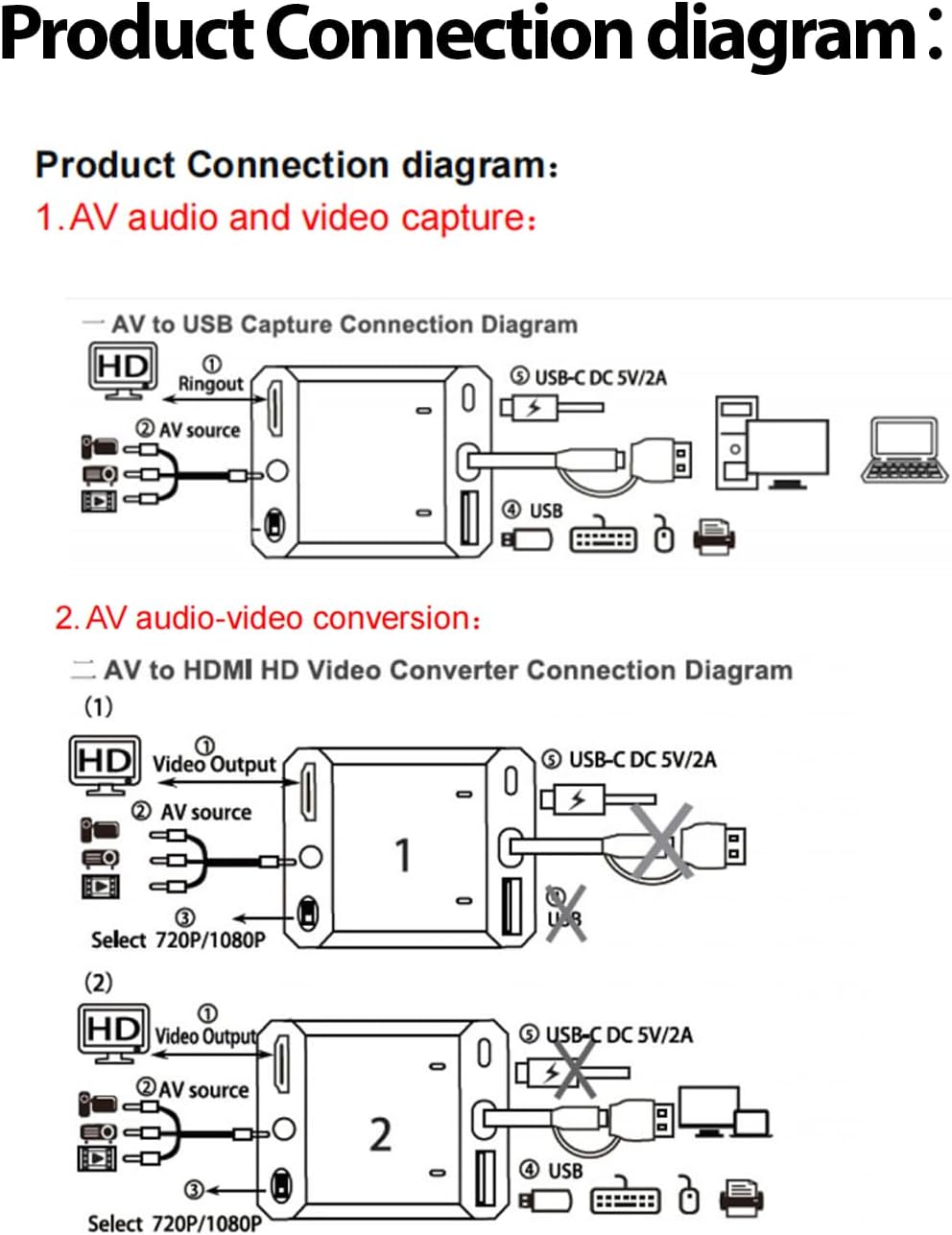
- Step 1 Insert the Device to a USB A/C port on your PC/laptop. Step 2 Connect Video Converter to your video sources with RCA or S-Video cable. Step 3 Open OBS Studio or Potplayer or QuickTime Player and run it. Step 4 Follow Above instructions or the user manual to begin capture / convert your videos.
- Step 1 Connect the device's HD port to the TV/monitor with HD cable Step 2 Connect the devices to Video source with RCA cable(Included) Step 3 Provide power supply (can be powered by USBC port or connected to laptop) Step 4 Follow Above instructions or the user manual to begin convert/disp;ay.
- Protective carton
- Converter Body
- RCA Cable male to male
- RCA Adapter femle to female
- Step 1 Insert the Device to a USB A/C port on your PC/laptop.
- Step 2 Connect Video Converter to your video sources with RCA or S-Video cable.
- Step 3 Open OBS Studio or Potplayer or QuickTime Player and run it.
- Step 4 Follow Above instructions or the user manual to begin capture / convert your videos.
- Step 1 Connect the device's HD port to the TV/monitor with HD cable
- Step 2 Connect the devices to Video source with RCA cable(Included)
- Step 3 Provide power supply (can be powered by USBC port or connected to laptop)
Share