1
/
of
8
Guermok
Guermok 4K USB 3.0 HDMI Capture Card for Streaming with PD 100W, 4K@60FPS | 2K@120FPS HDMI to USB C/A Capture Card for Streaming, Works with Pad, Tablet, MacOS, Switch2/1, Laptop, PC, Camera, VR, Black
Guermok 4K USB 3.0 HDMI Capture Card for Streaming with PD 100W, 4K@60FPS | 2K@120FPS HDMI to USB C/A Capture Card for Streaming, Works with Pad, Tablet, MacOS, Switch2/1, Laptop, PC, Camera, VR, Black
Regular price
$46.48 USD
Regular price
Sale price
$46.48 USD
Shipping calculated at checkout.
Quantity
Couldn't load pickup availability
About This
- 4K Ultra HD 60FPS Capture with PD 100W ChargingSupports stunning 4K Ultra HD video capture at 60FPS via USB 3.0, delivering crystal-clear, vibrant, and highly detailed footage. This HDMI Video Capture Card also supports PD 100W USB-C charging passthrough for compatible USB-C host devices on the capture side. MJPEG:4K/60HZ, YUY2:4K/25HZ, XRGB:1080P/60HZ. Note: For capture use only; requires capture software to function and is not intended for direct screen casting to a monitor or TV
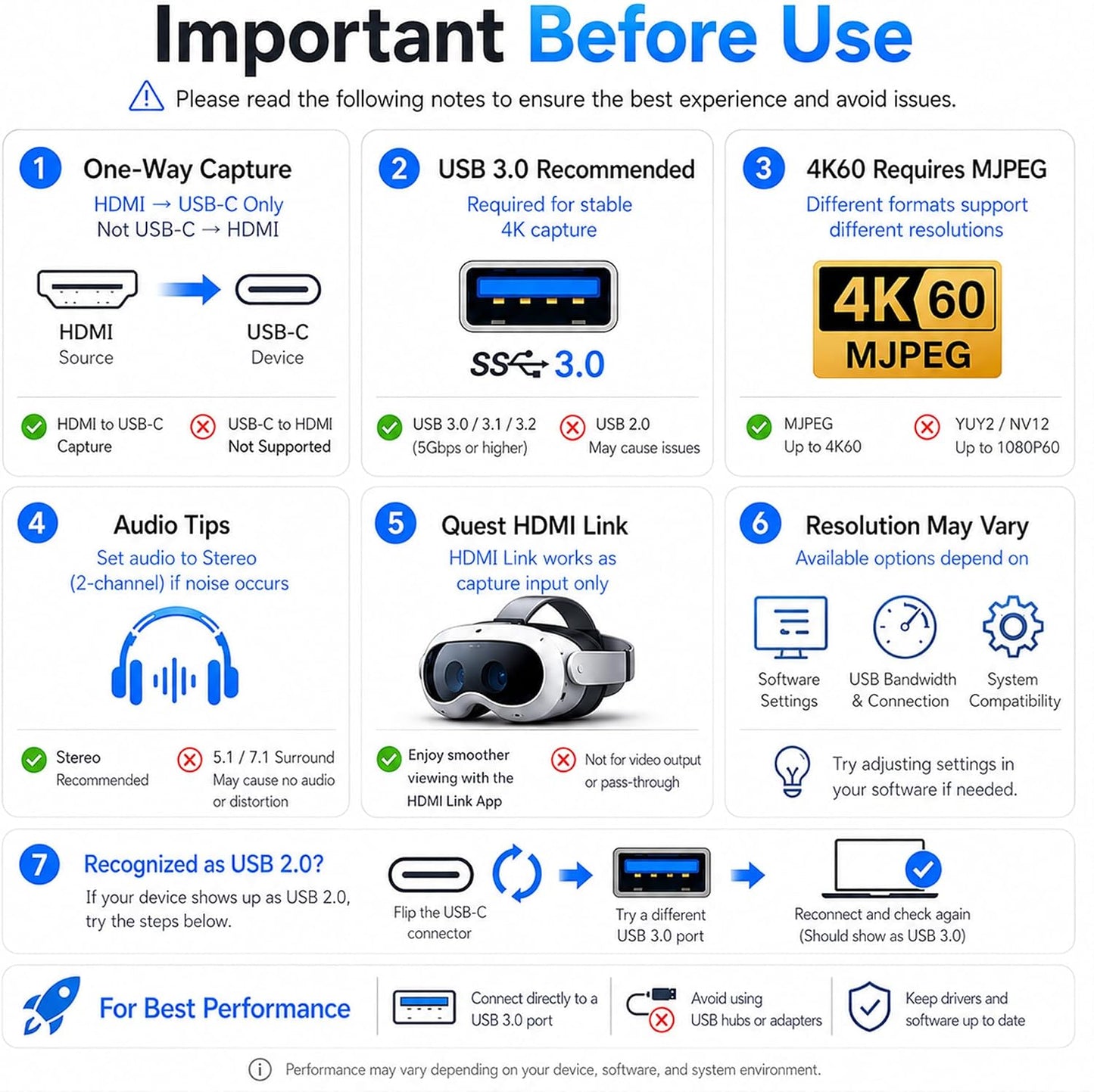
- High Refresh Rate Input: 2K@120FPS & 1080P@120FPSHandles high-frame-rate video input including 2560×1440@120FPS and 1920×1080@120FPS. Supports MJPEG, YUY2, NV12, and XRGB formats, providing smooth, detailed video capture for fast-paced games and dynamic content using a reliable HDMI to USB-C capture card. Please use a USB 3.0 or higher port to connect the device. USB 2.0 ports only support up to 1080P resolution. If the device still outputs 1080P when connected to a USB 3.0 or higher port, please rotate the capture card’s USB-C connector 180° and reconnect
- Capture While Charging Your Tablet or PadDesigned for tablet, pad, and compatible USB-C host capture setups, this capture card supports PD 100W USB-C charging passthrough to help keep the device running the capture software powered during long recording or streaming sessions. Please note: the charging function only supports the device on the capture/software side, not the HDMI source device or display device
- Versatile Device Support Optimized for Live StreamingPlug and Play with capture software—no drivers required; connect the capture card, open your preferred capture or streaming software, and start recording or streaming. Works seamlessly with Pad, tablet, MacOS laptops, Switch 2/1, PC, DSLR cameras, and VR headsets, making it suitable for gameplay broadcasting, virtual events, real-time content creation, and other live streaming setups
- Broad Software, OS & Adapter CompatibilityCompatible with popular streaming and recording apps like OBS Studio, Streamlabs, Zoom, VLC, PotPlayer, YouTube, Twitch, Vmix, HDMI Link, MoniCon, QuickTime, and more. Also works with Windows 7/8/10/11, macOS, Linux, Android 5.0+, and PadOS 17+. Includes USB-A male to USB-C female adapter for flexible capture connection. Please note: PD charging is only supported through compatible USB-C ports, not through the USB-A adapter
- NoteThis capture card supports one-way transmission (HDMI to USB-C). Video input via USB-C to HDMI conversion may cause signal loss due to cable protocol differences. If the PS5 shows a black screen, please disable HDCP. Use a USB 3.0 port whenever possible to ensure bandwidth and resolution. The capture card works through video decoding, which introduces millisecond-level latency, and different video formats (MJPEG, YUY2) support different resolutions. Signal loss may occur if the device disconnects; reconnect or restore default settings. To check if the capture card is functioning properly, connect the USB port to a computer or tablet and open your capture software to confirm detection
Overview
- Brand : Guermok
- Hardware Interface : USB 3.0
- Video Capture Resolution : 1080p, 4K
- Operating System : Mac OS, Windows 10, Windows 11
- Recommended Uses For Product : Game Streaming, Image Capture, Live Streaming, Video Recording
- The product supports 4K 60Hz input &4K 60Hz output. Please ensure that the cable you are using supports the corresponding resolution, such as 1080P or 4K, to ensure optimal video quality
- There may be a slight delay in the capture (40ms), but it is within an acceptable millisecond range and does not affect the video quality
- The USB-C port (or USB-A when using a USB-C to USB-A adapter) is for signal output .
- Please ensure your signal output device has corresponding video capture software, as OBS, to enable screen capture
- When using an adapter, if the device is recognized as USB 2.0, try using the other side with the USB-C port. Simply flip the capture card and reconnect it to be recognized as USB 3.0
- Make sure the output format is compatible with the capture card. After checking everything, try reconnecting the devices and resetting the software. If "no signal" persists, try using a different APP
- Please ensure your system is within the compatibility range. Do not support HD CP. Some products may require disabling HD CP settings to function properly
- Not all USB ports support 3.0 transmission. To ensure proper functionality, connect the device to a USB 3.0 port (often marked in blue or labeled "SS") and confirm your computer has the required USB 3.0 drivers installed
- Compatible with Quest, Android, and HarmonyOS; Note that HDMI LINK is not supported due to lack of 96kHz audio support, which may cause noise
- MiniCon allows you to transform your iPad into an external display, offering plug-and-play USB-C connection, low-latency performance, and crisp video—good for streaming and content creation on the go
- Using a capture card with QuickTime on Mac OS allows seamless, high-quality video recording and streaming. It offers easy integration with Mac's native tools, providing smooth performance
- Record USB video and screen easily on Android with USB Camera & XRecorder. Easy plug & play setup, output via USB 2.0 or USB3.0, depending on the type of port on your phone or other devices
- XSplit Broadcaster enhances capture card performance with seamless scene switching, pro-level audio/video mixing, and high-quality streaming or recording on PC
- Streamlabs Desktop combines pro-level features with effortless setup for seamless streaming, making it easy to manage your live broadcasts and content creation all in one place
- Guermok 4K Capture Card
- Guermok HDMI Capture Card
- Redefining Gaming, Uniting Office Excellence, and Live Streaming Thrills
- Guermok's story unfolds at the intersection of passion for gaming, the pursuit of streamlined office life, and the captivating allure of live streaming. We believe that these realms aren't just separate activities but integral parts of modern living. Our commitment is to provide innovative products that fuse these elements harmoniously.
Share