1
/
of
8
Amazon
Acer Wired Gaming Mouse, 12,800 DPI RGB Ergonomic Computer Mouse for PC | Optical Sensor, 12 Backlit Modes, 8 Programmable Buttons, Software for DIY Keybinds, Rapid Fire, USB Mouse for Laptop
Acer Wired Gaming Mouse, 12,800 DPI RGB Ergonomic Computer Mouse for PC | Optical Sensor, 12 Backlit Modes, 8 Programmable Buttons, Software for DIY Keybinds, Rapid Fire, USB Mouse for Laptop
Regular price
$38.73 USD
Regular price
Sale price
$38.73 USD
Shipping calculated at checkout.
Quantity
Couldn't load pickup availability
About This
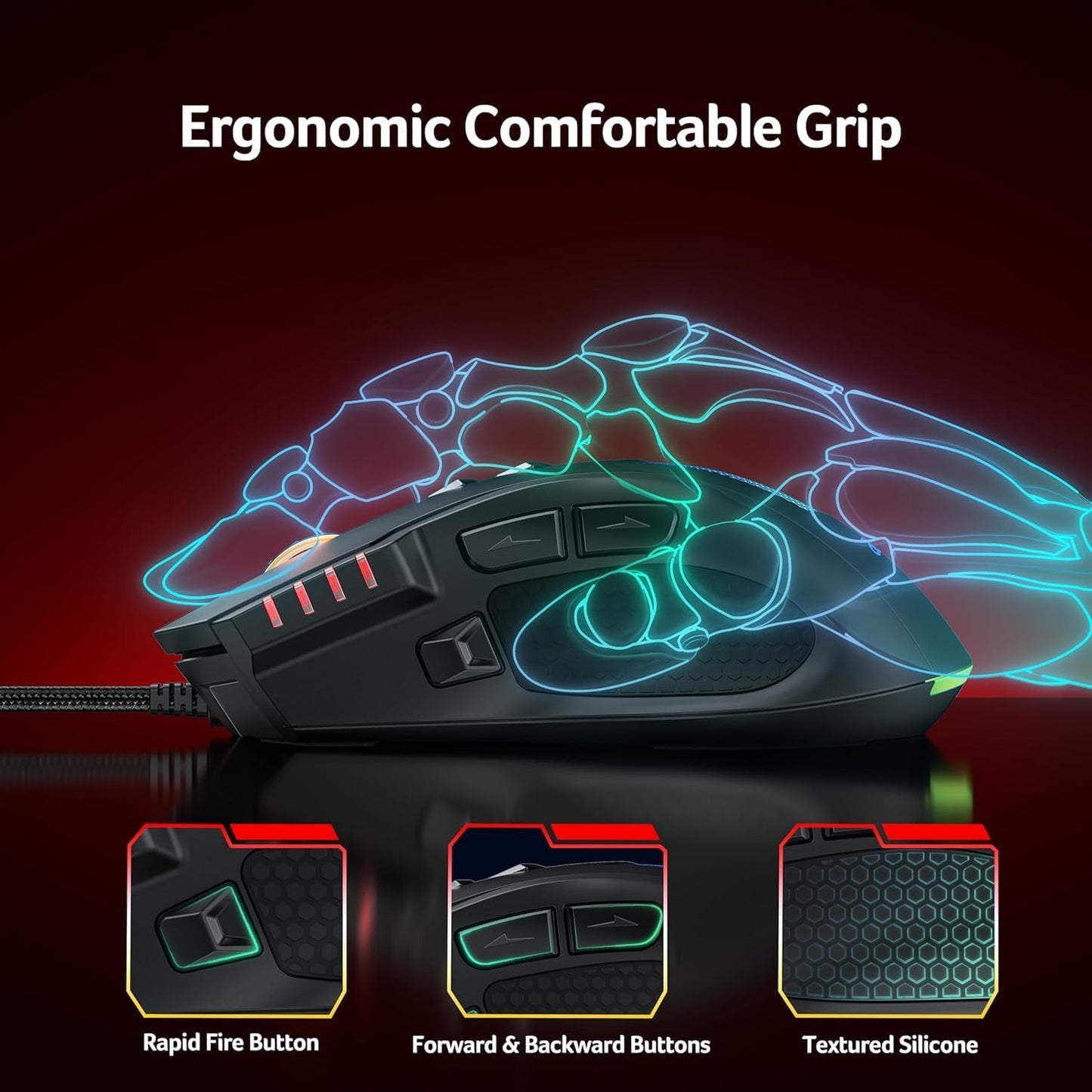
- Balanced Weight & Mid-Hand ComfortThis wired gaming mouse features a larger ergonomic shape for a comfortable mid-hand grip, allowing your hand to rest naturally without cramped positioning. The balanced weight adds stability without feeling heavy. With 1000Hz polling, 20G acceleration, and 7000 FPS scanning, it delivers smooth tracking for sniper precision in FPS games and quick reactions in fast-paced battles.
- Easy-to-Reach 8 Programmable ButtonsDesigned with accessibility in mind, the buttons on this computer mouse are thoughtfully placed for quick reactions without awkward finger stretches. Use the driver to remap buttons, assign macros, adjust DPI, and customize RGB effects. Ideal for lightning flicks, FPS precision aiming, MOBA skill combos, or everyday productivity. After customizing, click the red “√” to save settings.
- Stylish RGB, Fully CustomizableEnjoy a colorful RGB setup on this pc mouse for laptop, with 12 options to match your mood or rig. Choose a static color or run dynamic rainbow effects for a bold look. Lighting can be cycled directly on the mouse or customized in the driver. Hold the DPI button for 3 seconds to toggle lighting. RGB can also sync with music via the driver.
- Variable DPI for Precision & ControlInstantly switch between 4 adjustable DPI levels (1200/2400/3200/6400) or unlock up to 12,800 DPI via software for precise sensitivity control. Easily adjust sensitivity for better accuracy, and smoother control. This USB gaming mouse delivers fast movements without noticeable lag for competitive gaming, dominate battles. From steady aim to rapid flicks on 4K displays, it adapts to your playstyle.
- No Batteries Required, Just Plug InPowered via USB-A, this wired gaming mouse for computer delivers stable, low-latency performance without charging or battery changes. Onboard memory saves your settings, while the durable braided cable ensures longevity. Compatible with Windows, macOS, and Linux, it’s perfect for gaming, productivity, and everyday tasks. For Mac devices, please use a USB hub or adapter, and avoid low-power hubs to ensure stable performance.
- Driver Download GuideDownload instructions are provided in the User Manual PDF on this product page. Scroll to “Product guides and documents” and open the User Manual PDF for step-by-step driver installation instructions.
Overview
- Brand : Acer
- Color : Black
- Connectivity Technology : USB
- Special Feature : 12800 DPI Optical Sensor, Perfect for Medium Hand, 4 Personalized DPI, LED Lights with Gradient Underglow, Rapid Fire & Macros, Ergonomic Design, Drag-Free Paracord See more
- Movement Detection Technology : Optical
- Acer Dual Mode Gaming Mouse
- Acer Wireless Mice
- Dual Mode Gaming Mouse Learn More
- Previous page
- Precise Optical Sensor
- Frictionless Aim
- Game-Ready Durability
- No-Slip Hold
- I can’t download the driver — what should I do?
- Download instructions are provided in the User Manual PDF on this product page. Scroll down and open the User Manual (PDF) for driver installation instructions.
- How do I turn RGB lighting on or off?
- You can switch lighting effects either through the driver or by pressing and holding the DPI button for 3 seconds.
- Is this mouse right for my hand size?
- This gaming mouse is fit for righted hand. With dimensions of 4.7" L x 2.9" W. Perfect for medium hands. With a 4.7" length, it's ideal for a secure palm grip if your hand measures 6.7 to 7.5 inches (170-190mm). If your hand is over 7.5 inches, you can still use it comfortably with a relaxed palm or claw grip, though it may not fill your palm completely.
- The mouse cursor moves by itself or drifts to the right — how can I fix this?
- The left/right mouse buttons are difficult to press. How can this be resolved?
- When using the mouse, ensure you press the centre of the left and right buttons (aligned with the centre of the scroll wheel).
- Why is my DPI capped at 6400?
Share