1
/
of
8
Quntis
Quntis Curved Monitor Light Bar with Soft Backlight, Dual Curve-Matching Pivoting Arms for 1000R–3000R 34" Ultrawide Screens, 1400 Lux CRI 98 Eye Care Desk Light, Auto-Dimming & Remote for Home Office
Quntis Curved Monitor Light Bar with Soft Backlight, Dual Curve-Matching Pivoting Arms for 1000R–3000R 34" Ultrawide Screens, 1400 Lux CRI 98 Eye Care Desk Light, Auto-Dimming & Remote for Home Office
Regular price
$89.98 USD
Regular price
Sale price
$89.98 USD
Shipping calculated at checkout.
Quantity
Couldn't load pickup availability
About This
- Dual Independent Adjustable Light Bars: This 34-inch, Arc-shaped light bar is specially designed for 1000R-3000R ultrawide curved and large screens. It features two curved LED light bars that pivot independently for flexible and precise lighting control. You can expand both bars outward for wide desk coverage or fold them inward for focused, intense light. Customize the angles to match your curved monitor setup or task requirements, effectively eliminating shadows and glare
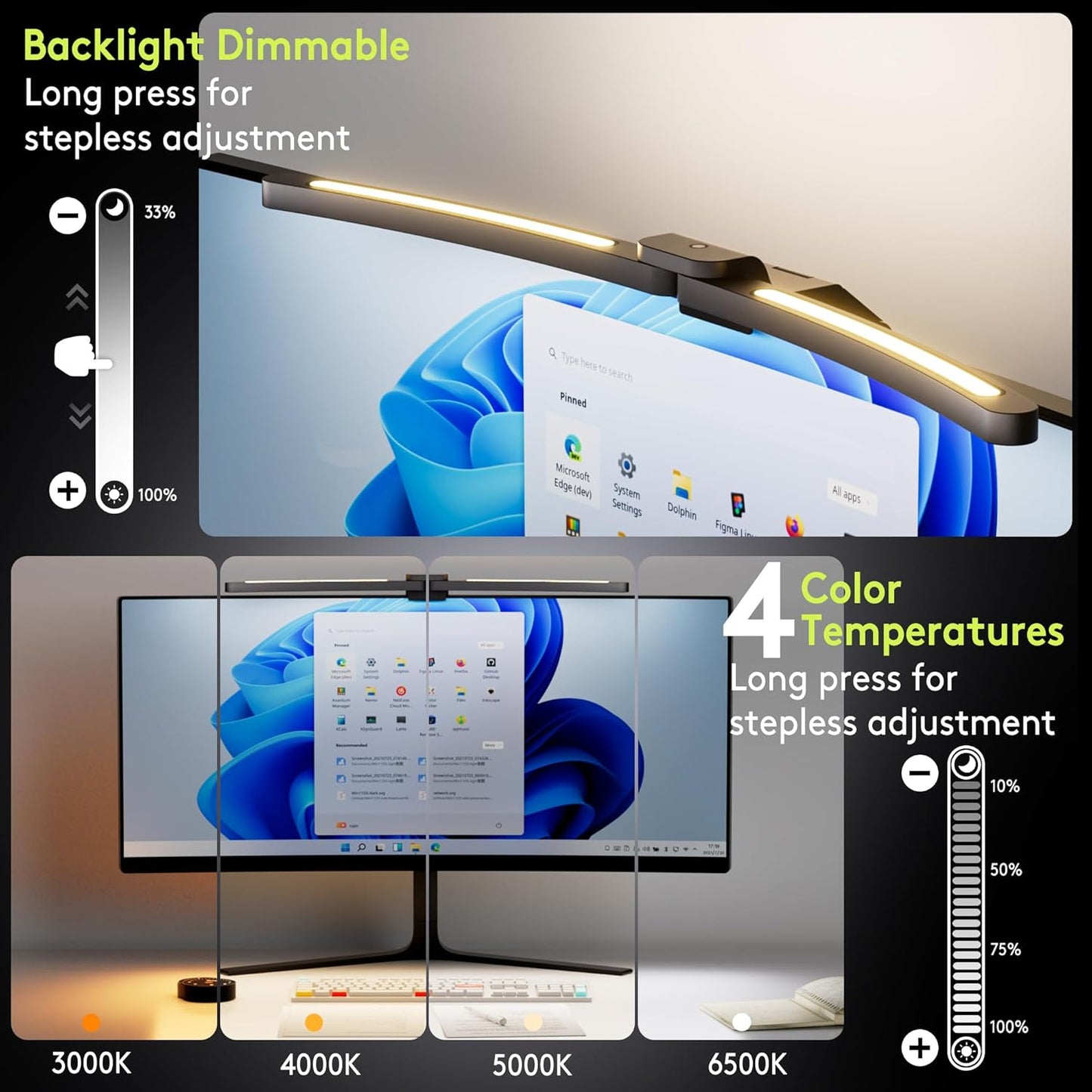
- Dual Lighting, Front and Backlight: Our front light(4 color temperature/brightness settings) and innovative backlight minimize screen glare caused by contrast, ensuring optimal eye comfort. With upgraded eye-care technology, you can say goodbye to screen glare and reflections. Enjoy ample, glare-free illumination with a remarkable center brightness of over 1400 lux, whether you're working late or gaming. Let this computer lamp help create an environment that nurtures focus and sparks passion
- Say Goodbye to Bulky Lamps & Space-saving: Our newly designed sliding weighted clip lamp not only saves desk space but also delivers a stylish, tidy lighting experience. It securely hangs on various monitors without causing damage, making it the perfect addition to your desktop setup. Whether you're using a sleek ultra-thin monitor or a over 1000R ultrawide curved monitor, the Quntis monitor light bar enhances both the aesthetic appeal and personality of your gaming space
- HIGH RA98 CRI: As night falls, our desk lamp becomes your guiding light. Crafted with 112 high-quality LED beads, this computer monitor light provides even and ample illumination, whether you're reading, gaming, or working. Experience more than just comfort with our lamp—it restores the true colors of your screen. Whether you're enjoying the subtle hues of a movie or the visual feast of gaming, our desktop light guarantees the most authentic color experience
- Brains in a Beam: The power-off memory function saves your settings, eliminating the need for tedious reconfiguration after each restart. Hold the backlight button in the lower left corner to “One-Touch” brightness adjustment. When the lower right button lights up, the auto-dimming sensor takes over, adjusting brightness automatically in real time based on ambient light—completely hands-free. From focused mornings to cozy evenings, it protects your eyes effortlessly, so you can enjoy comfort without interruptions
- Quntis Curved Monitor Light Bar Glow 26 inch (66 cm) Black
Overview
- Batteries : 3 AAA batteries required.
- Finish types : Unfinished
- 26'' Arc-shaped specially designed for Curved and Large Screen ; Latest Foladble Design for 180° Adjustable Illumination Range.
- My monitor has an ultra-thin bezel. Will the clamping mechanism hold securely without damaging the screen?
- Yes, it's safe for ultra-thin bezels. The clamp has a protective silicone pad and is designed to grip the monitor's body securely without putting pressure on the fragile screen edge.
- Ultra-strong tri-folding clip creates a stable platform, while the USB-C elbow cable frees up space, keeping your webcam secure and your desktop tidy.
- The backlight provides functional bias lighting. When a screen is the only bright object in a dark room, the pupils continuously contract and expand, which can cause eye fatigue. The backlight helps reduce strain and improves overall visual comfort.
- Why does the curved plus monitor light bar automatically brighten or dim?
- To protect your eyes, the light sensor automatically balances the light bar's brightness with your environment for optimal comfort. You can turn off this auto-adjustment using the remote control.
- Why doesn't my remote controller work?
- The controller is not faulty. When idle, the icons dim. To activate the controller, tap any function icon first (not the display panel). Then press another icon to use its function.
- My monitor has an ultra-thin bezel. Will the clamping mechanism hold securely without damaging the screen? Yes, it's safe for ultra-thin bezels. The clamp has a protective silicone pad and is designed to grip the monitor's body securely without putting pressure on the fragile screen edge.
- Why does the curved plus monitor light bar automatically brighten or dim? To protect your eyes, the light sensor automatically balances the light bar's brightness with your environment for optimal comfort. You can turn off this auto-adjustment using the remote control.
Share