1
/
of
8
VSDINSIDE
VSDINSIDE Macro Keypad, Stream Controller Deck Gaming Streaming Shortcut Keyboard, 18 Programmable Keys Customizable Visual AI Pad USB Soundboard for OBS, YouTube, Desk Office Setup, Laptop, PC, Mac
VSDINSIDE Macro Keypad, Stream Controller Deck Gaming Streaming Shortcut Keyboard, 18 Programmable Keys Customizable Visual AI Pad USB Soundboard for OBS, YouTube, Desk Office Setup, Laptop, PC, Mac
Regular price
$82.48 USD
Regular price
Sale price
$82.48 USD
Shipping calculated at checkout.
Quantity
Couldn't load pickup availability
About This
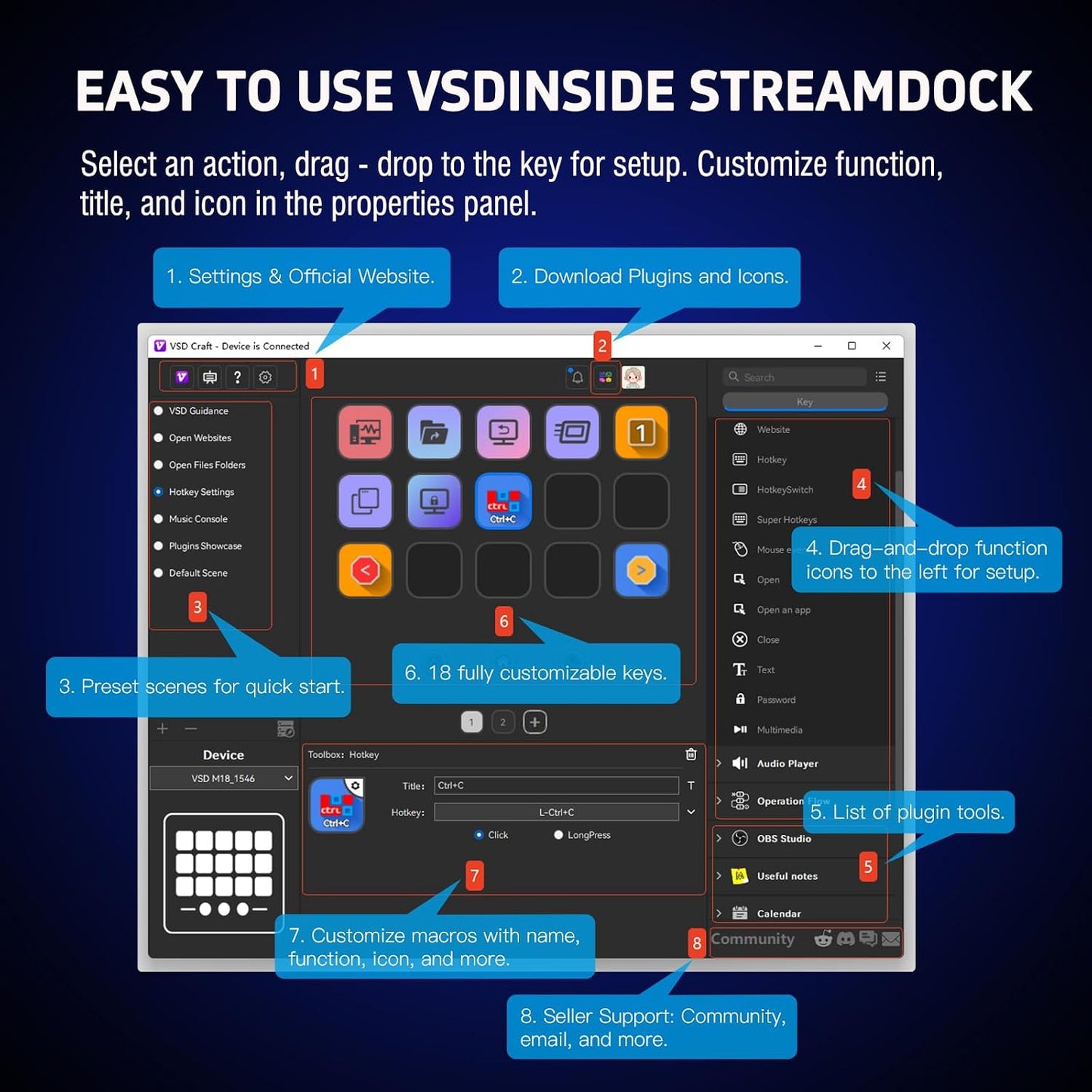
- 18 Programmable Keys Macro Keypad: This stream controller deck comes with 18 customizable macro keys (15 LCD visual keys + 3 physical buttons). Users may program single actions or multi-step sequences for daily operation. The keys support in-game combos, app launch and media playback control for multiple usage scenarios. Each LCD key accepts JPG, PNG and GIF images and animations to mark separate functions
- Single Tap Control: This USB macro keyboard pad supports single tap commands for quick operation. Users can trigger pre-set macros, input text, open files and web pages, adjust media playback, or switch OBS scenes with one tap. The straightforward layout fits gaming, live streaming and professional office task setup
- One Tap Multi-Shortcut: This macro controller pad streaming deck supports multi-shortcut macro programming for gamers and content creators. Custom shortcuts simplify game combo inputs, video editing, music production and photography workflows. The Operation Follow function runs multiple macro steps in custom order or simultaneous execution for adjustable task control
- Adjustable RGB Surround Light Ring - VSD M18 gaming streaming deck features an outer RGB light ring with auto color cycle mode. Custom RGB tones are available via device firmware upgrade. The light ring offers adjustable visual lighting for dim gaming, streaming and night work setups.
- Wide System Compatibility: This VSDinside macro control board works with Windows 11 and newer, macOS 11.0 and newer systems. Connect via USB-C cable for immediate use. It is compatible with mainstream software including OBS, Streamlabs, YouTube, Twitter, Discord, Excel, Word and Photoshop for daily production work. Native Linux system plug-and-play support is not available, while SDK development documents are provided for custom secondary development
- Solid Construction & Built-In Plugins: The macro pad is made of sturdy materials and passes standard quality inspection for stable long-term operation. It comes with multiple built-in functional plugins such as schedule reminder, clock, stopwatch, weather and calendar modules to assist daily desktop operation.
Overview
- VSDinside Streaming Deck Controller , an unbeatable-value smart macro keypad, is perfectly suited for gamers, streamers, and professional content creators.
- With this live-streaming device, enjoy
- 10x faster streaming setup!
- Director-free streaming management!
- One-click sound effect control!
- Instant background music switching!
- Seamless live screen transitions!
- Single-hand camera control!
- Lightning-fast message replies!
- Once you experience the VSDinside STREAMING DECK smart console, you’ll find live streaming is no longer possible without it. Every button can be customized, transforming this device into your personalized personal assistant and elevating the experience of controlling APPs, external devices, and MIDI devices to a new level. It’s not just for live streaming, when retouching in Lightroom or editing videos in Final Cut, you can design a unique control interface for it. It can become any form you envision.
- One Interface, Limitless Possibilities
- The VSDinside macro keypad empowers you to take charge of your workflow with a single, intuitive interface. Say goodbye to complex setups and hello to a streamlined experience that saves you time and effort. With its 18 fully customizable macro keys (15 LCD keys and 3 button keys), you can create shortcuts, macros, and commands tailored to your specific needs, whether you're live-streaming on Twitch, Youtube, editing videos, or managing intricate tasks.
- VSDinside Streaming Deck - Your Ultimate Workflow Companion
- Elevate your content creation, gaming, and productivity to new heights with the VSDinside Stream Controller Deck. Designed with precision and innovation, this multifunctional visual AI keypad is a game-changer for gamers, streamers, and professionals seeking seamless control and efficiency.
- Key Features
- 18 Programmable Keys Macro Keyboard
- The heart of the Stream Dock Deck lies in its 18 customized shortcut keys (15 visual LCD + 3 buttons). These keys offer unparalleled flexibility, allowing you to assign individual or a series of actions to streamline your workflow. Whether it's triggering game combos, launching apps, or controlling media, the possibilities are endless. You can even personalize each LCD key with different images and animations (JPG, PNG, GIF) for enhanced recognition and memorization.
- Surrounding RGB Light Ring
- Immerse yourself in a captivating desktop experience with the VSD Stream Controller Deck's surrounding RGB light ring. This feature supports automatic color cycling and custom RGB colors, adding a touch of style and ambiance to your setup. Whether you're gaming in the dark or working late into the night, the RGB light ring creates a visually stunning atmosphere that enhances your overall experience.
- One-Touch Operation
- Efficiency is at your fingertips with the Streaming Deck's one-touch operation. Instantly launch macros, input text, open files and websites, control media, or switch scenes in OBS with a single click. This intuitive design makes it perfect for gamers, streamers, and professionals who need to trigger tasks quickly and accurately.
- One-Click Multi-Hotkey Macro Pad
- The Streaming Deck's one-click multi-hotkey macro keypad is a game-changer for gamers and content creators. Use hotkeys (shortcut keys) to streamline your game combos, video editing, music production, photography workflows, and more. The "Operation Follow" feature allows you to trigger multiple macro operations simultaneously or in a specific sequence, giving you complete control over your tasks.
- Why Choose VSDinside?
Share