1
/
of
8
QIACHIP
QIACHIP Ewelink 2.4G Wireless Remote Control Light Socket E26 E27 Bulb Socket Adapter, Bluetooth Smart Lamp Holder,Support APP Timing Delay (2 Socket + 1 Switch)
QIACHIP Ewelink 2.4G Wireless Remote Control Light Socket E26 E27 Bulb Socket Adapter, Bluetooth Smart Lamp Holder,Support APP Timing Delay (2 Socket + 1 Switch)
Regular price
$32.11 USD
Regular price
Sale price
$32.11 USD
Shipping calculated at checkout.
Quantity
Couldn't load pickup availability
About This
- Two remote control methods ①Wireless switch panel remote control, the switch adopts 2.4G technology, can pass through the wall, strong anti-interference, the longest distance up to 25 meters.②Support Ewelink APP bluetooth control, please create the button in the app first, then pair it with the lamp holder. (The phone is also equivalent to a remote control)
- Delay and scene setting function You can set the function of delay on or off (ranging from 5 minutes to 20 hours), or set the scene (you need to learn the scene remote control after completing the setting).
- Group Control Set all smart light bulb sockets as a group and turn off with one key. One lamp head can be controlled by multiple mobile phones. Share it with your family and everyone can easily control it. Great for hard-to-reach lights without an ON/OFF switch
- Multiple remote controllers can be addedUp to 4 remote controllers (APP remote controller + RM remote controller) can be added to the switch device, and if more than 4 remote controllers are added, the data of the first remote controller will be automatically covered.
- 25 METERS RANGE OF SWITCH PANELYou can install the wireless switch panel fixed on other floors, powerful 2.4ghz signal covers up to 80FT in open area, you can control garage, porch, stairs and basement lights from your bed or couch, no wiring required, easy to use. Back panel sliding cover design, you can easily change the battery. Need to buy 2 extra AAA batteries.
- Gateway linkage It can be used with 2.4g smart gateway to realize remote control and voice control (gateway needs to be purchased separately)
Overview
- Brand : QIACHIP
- Light Type : CFL, Incandescent, LED
- Special Feature : Timer
- Bulb Base : E26
- This smart lamp socket runs without Wi-Fi, controllable via Bluetooth eWeLink App or 2.4G RF remotes.
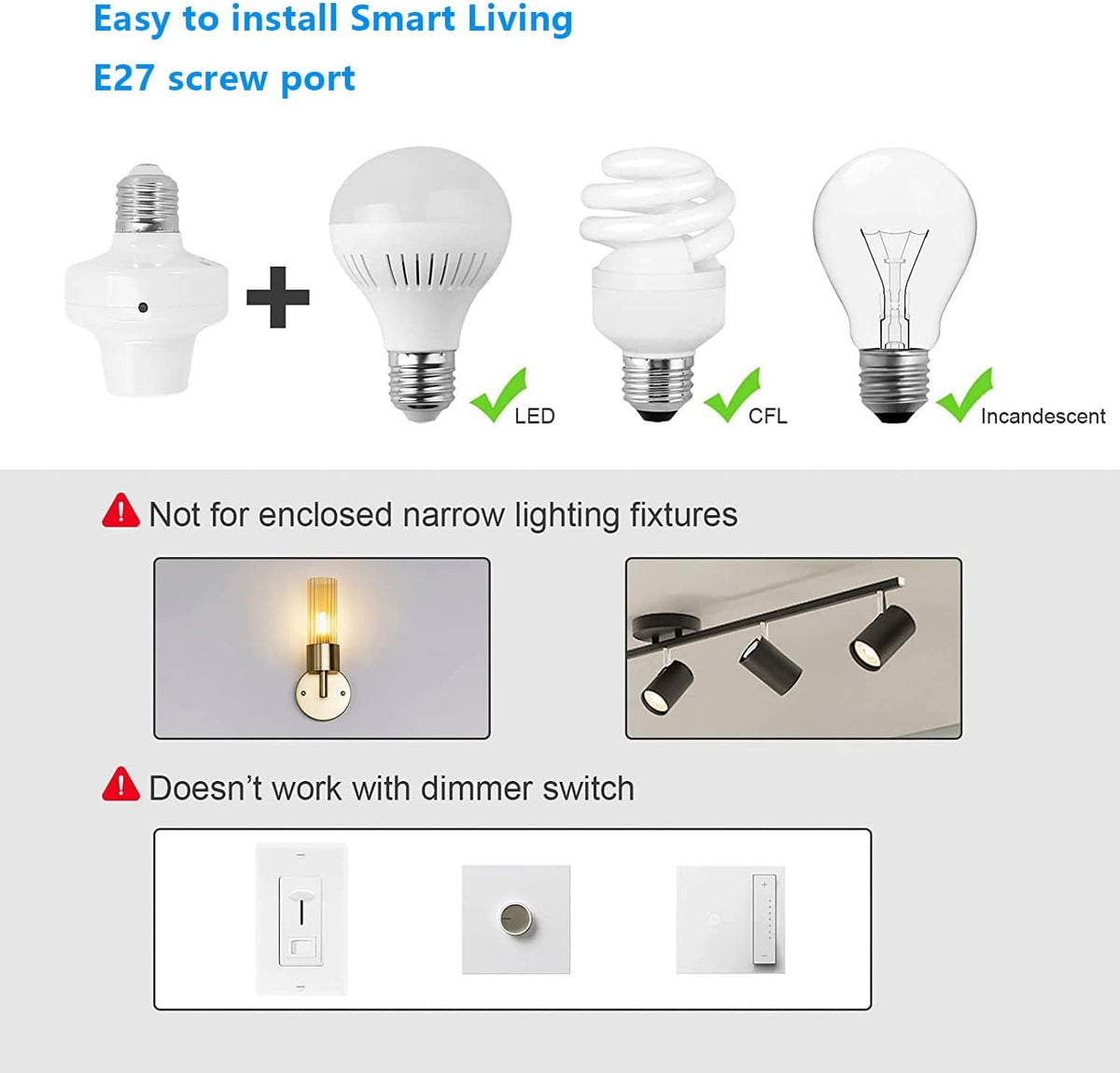
- [Easy Screw-In Installation] Screw into standard E26/E27 lamp bases directly. No wiring, great for renters.
- [Adjustable Delay On/Off Timer] Adjust single delay from 5 mins to 20 hours for delayed light on/off.
- Note: This unit only supports single delay timers; recurring scheduled automation is unavailable.
- [Multi-Light RF Remote Control] Matches handheld remote & stick-on wall switch. 4-group independent control + one-tap ALL ON/OFF.
- [Custom Power Recovery Mode] Pick light status after power outage: ON, OFF, Last State, Reverse.
- [Family Access Sharing] Share permanent or temporary device access with family on App.
- [Wide Bulb Compatibility] Max 60W LED/CFL, max 100W incandescent bulbs.
- Supports LED & CFL bulbs up to 60W, incandescent bulbs up to 100W.
- Our smart light socket fits most standard E26/E27 bulbs for daily lighting use.
- The 4-channel remote pairs with multiple smart lamp sockets separately.
- One-touch ALL ON / ALL OFF buttons control all paired lights at once for easy whole-house lighting management.
- Battery-powered wireless wall switch attaches anywhere with adhesive tape, no hard wiring needed.
- Sliding back cover enables quick AAA battery replacement, great for renters to add extra light control points.
- Customize delay timing from 5 minutes up to 20 hours via App. Set delayed light turn-on or turn-off to simulate occupancy, ideal for home security and bedtime routines.
- Pick your preferred light status after power outage recovery: ON, OFF, Last State or Reverse mode. Avoid unexpected lighting status when power comes back.
- Share smart socket access with family members easily. Choose permanent or temporary permissions, and you fully manage who gets to control your lights.
- Step 1: download 'Ewelink' APP.
- Step 2: Open the ewelink app, tap the “+” icon on the home screen, and select “Scan” to create a button.The QR-code can be found on the box and in the manual.
Share