1
/
of
8
WAVLINK
WAVLINK Laptop Docking Station, Docking Station Dual Monitor for HDMI | Single 4K@60Hz, 100W PD in,3×USB-C/A 10Gb, Gigabit Ethernet, Compatible with Dell/HP/Lenovo, Windows Only
WAVLINK Laptop Docking Station, Docking Station Dual Monitor for HDMI | Single 4K@60Hz, 100W PD in,3×USB-C/A 10Gb, Gigabit Ethernet, Compatible with Dell/HP/Lenovo, Windows Only
Regular price
$59.98 USD
Regular price
Sale price
$59.98 USD
Shipping calculated at checkout.
Quantity
Couldn't load pickup availability
About This
- 10Gbps Docking Station - 5Gbps USB 3.0? It's outdated! 10Gbps is now the mainstream configuration. This USB C hub is equipped with two 10Gbps USB-A port and one 10Gbps USB-C port, giving you a super fast transmission experience! And 2 USB 3.0, USB 2.0? Of course, this is not used for data transmission, it is designed for your wireless devices using.
- Docking Station dual HDMI - Writing code and checking stocks, what to do if one screen is not enough? Try this! Docking station dual HDMI, 4K@60HZ+4K@30HZ, extending two different display to meet your meeting, work, and stock trading needs. This function for windows only.
- Docking Station With 100w Power Delivery - Say goodbye to low battery! Docking station with 100W power delivery, 85W for laptop charging. Our products do not come with a charger, please use a 20V/5A/100W charger. Please confirm your computer charging power, it will not charge if it is higher than 85W.
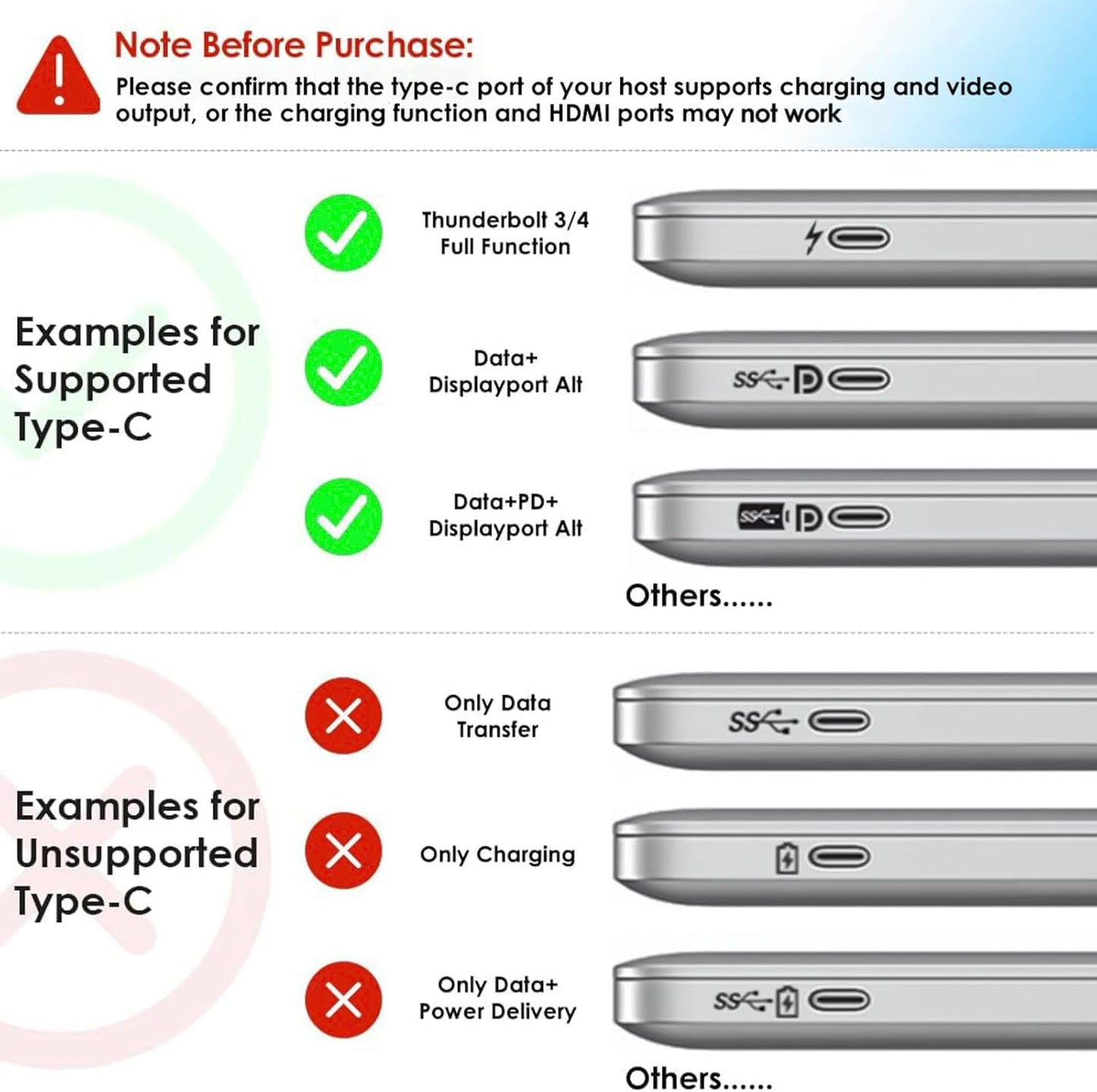
- Note - Not compatible with any MAC OS computer. Please make sure that the type-C port of your host supports charging and video output. Please make sure that your laptop supports DP1.4+DSC, if not, the resolution will not be as high as mentioned above. The charger is not included. The charger you use must be 20V/5A, and cannot charge a laptop computer with a power of more than 85W.
Overview
- Brand : WAVLINK
- Color : sliver
- Hardware Interface : Ethernet, HDMI, USB 2.0, USB 3.0
- Special Feature : Fast Charging, Fast Data Transfer, Plug and Play
- Compatible Devices : Dell, HP, Lenovo, Windows
- Why buy this docking station ?
- Docking station for Professional Creative Work - lf you are a designer,editor, or photographer who frequently uses professional software such as PS PR AE, do what u need.lt single 4K@60Hz display, Supports up to two extended displays.
- How to use this product ?
- 1. Connect: Plug the docking station into your computer, then connect the monitor to the docking station.
- 2. Power: Plug in the docking station's power cable.
- 3. Settings: On Windows, right-click the desktop → select [Extend/Mirror these displays].
- Does Mac OS support extending to different screens ?
- No! Due to limitations of the Mac OS chip, all extended displays will be identical.
- Why isn't my monitor responding ?
- Please ensure the USB-C port on your host laptop supports video output and charging functionality.
- If you're unsure, you can check the product detail page images or provide us with your laptop model.
- Dual HDMI dock
- 2*DP+HDMI Dock
- 2*DP+HDMI+VGA Dock
- 2*HDMI+DP Dock
- 2*HDMI+DP+VGA Dock
- 2*DP+2*HDMI Dock
- WAVLINK MST docking station
- WAVLINK MST dock with charger
Share