1
/
of
8
Rii
Rii RK100+ Multiple Color Rainbow LED Backlit Large Size USB Wired Mechanical Feeling Multimedia PC Gaming Keyboard,Office Keyboard for Working or Primer Gaming,Office Device
Rii RK100+ Multiple Color Rainbow LED Backlit Large Size USB Wired Mechanical Feeling Multimedia PC Gaming Keyboard,Office Keyboard for Working or Primer Gaming,Office Device
Regular price
$23.98 USD
Regular price
Sale price
$23.98 USD
Shipping calculated at checkout.
Quantity
Couldn't load pickup availability
About This
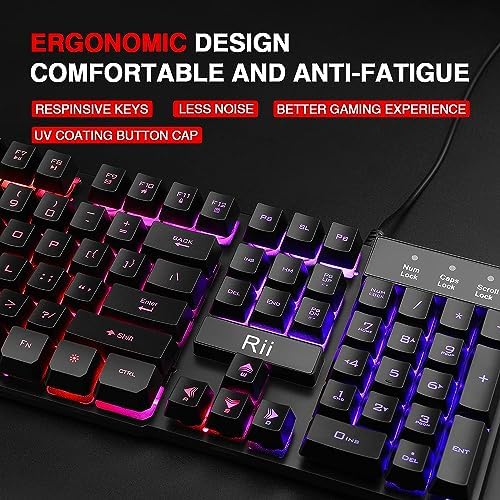
- Rii Wired Multimedia Gaming KeyboardProfessional Mechanical feeling backlit gaming keyboard,Ideal for desktop and PC; Can be used for gaming and office,not the real mechanical keyboard,,but it worth more.
- Support Win10, Win8, Win7, Linux, Vista, IBM PC Laptop Pad Google Android TV Box HTPC IPTV Smart TV Mac OS Raspberry Pi ,Chrome OS and Linux OS
- Features rainbow backlight with breathing light function; Press fn + light key to enter into breathing light mode; Press light button thrice to turn off backlight
- Standard 105 Keys full size keyboard; Comes with 11 special designed multi media keys combinations,Measures 17.1 x 5.3 x 0.9 inches
- Automatically enters sleeping mode if not used for 10 minutes; Any key press will awaken and backlights turn back on
Overview
- Compatible Devices : PC
- Connectivity Technology : USB
- Keyboard Description : Gaming
- Recommended Uses For Product : Gaming
- Special Feature : Backlit
- Color : Rainbow LED Backlit/Black keys
- Style : New RK100+
- Material : Acrylonitrile Butadiene Styrene
- Features rainbow backlight with breathing
- light function; Press fn + light key to enter
- into breathing light mode; Press light button twice to turn off backlight
- Support Win10, Win8, Win7, Linux, Vista, IBM PC Laptop Pad Google Android TV Box HTPC IPTV Smart TV Mac OS Raspberry Pi ,Chrome OS and Linux OS
- Multimedia key description: FN+F1=music FN+F7=Play FN+F2=Volume- FN+F8=Next FN+F3=Volume+ FN+F9=Mailbox FN+F4=Mute FN+F10=Internet explorer FN+F5=Stop FN+F11=Lock FN+F6=Previous FN+F12=Keyboard
- Trouble shooting steps
- 1.buttons do not work;The lights on the keyboard flash and don't stay on;
- please make sure that the USB connector plug the port of the PC tightly;
- 2.Lights up but when pushing keys does not type on the screen;
- the keyboard have auto sleep function,if do not use for 10 minutes;press any key will be awakened and backlight turns on;then to see if the keys can type;
- 3.Tried to use. Lights up but won't type and keeps throwing driver issues;
- 1.please make sure that the USB connector plug the port of the PC tightly;
- 2.If keyboard still do not type,please replug the USB connector into the PC,,or turn off the PC ,then turn on PC ,to see if the keyboard can type;
- All Rii keyboards designed by Riitek Team. Engineering Culture drive Riitek development. All keyboard and mouse remotes make your smart life more convenience! Enjoy the Smart life with Rii keyboard mouse remotes!
Share