1
/
of
8
VIXLW
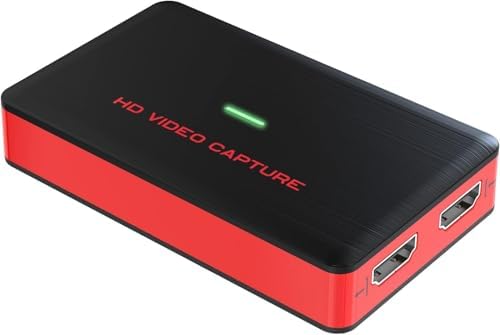
4K HDMI Game Video Capture Card, HD 1080P 60FPS Audio Video, Gaming, Live Streaming, USB 3.0 HDMI to USB Capture Card Compatible with Windows Linux Os X System Xbox 360,Wii U,PC
4K HDMI Game Video Capture Card, HD 1080P 60FPS Audio Video, Gaming, Live Streaming, USB 3.0 HDMI to USB Capture Card Compatible with Windows Linux Os X System Xbox 360,Wii U,PC
Regular price
$34.08 USD
Regular price
Sale price
$34.08 USD
Shipping calculated at checkout.
Quantity
Couldn't load pickup availability
About This
- 1080p@60fps Capture CardWith high speed USB 3.0 technology, support to capture and transfer 1080P 60FPS HDMI Video signal to your PC, Macbook and mobile phone. (with Type-C adapter)
- ZERO Latency HDMI Pass-throughRecord audio & video from external devices via HDMI port. There is no latency when you are making a game live streaming.
- Plug and Play, No Need to Install DriversNo driver required, simply plug and play this device to start recording. Record HDMI signal source directly, No HDMI splitter needed anymore.
- Stronger CompatibilityCompatibility with 1080P 720P hdmi device such as Wii U, PS4, PS3, Xbox One, Xbox 360, Wii, etc and it can be plug-and-play for Windows 7,8,10, Linux, OS X 10.9 or above.
Overview
- Brand : VIXLW
- Hardware Interface : USB 3.0
- Video Capture Resolution : 1080p, 4K
- Operating System : Windows 7, Windows 8, Windows 10, Linux, macOS
- Platform : Linux, PlayStation, Windows
- 1. Download OBS Studio according to your computer’s operating system, and install it on your computer.Windows will install the driver automatically, and you will see “FHD Webcamera” in device manager.
- 2. Run OBS Studio, Click “+” icon under “Sources” window, and select “Video Capture Device”, then select “FHD Webcamera” in the drop box next to “Device”.
- 3. Set the video latency for make the audio and video synchronized
- (3.1) Right click “Video Capture Device” then click “Filters”
- (3.2)Click to add “Video Delay (Async)”
- (3.3) Set it to 470ms (You can adjust it smaller or bigger uttil you found the audio and video synchronized)
- Then you can recording or streaming video.
- (Attention: Work with other applications(e.g. VLC, Media encoder, Protplayer…)
- Just run the application then choose capture device to “FHD Webcamera”.)
- VIXLW: Connecting Infinite Possibilities
- Users usually encounter problems such as image delays and impaired image quality during video transmission and conversion. To solve these problems, VIXLW was born with a passion for video technology, determined to create the ultimate experience of video capture cards and converters.
- Video Converter
- Capture Card
- Video Capture Card
- HDMI Capture Card
- Video/Audio Input
- Video/Audio Output
Share