1
/
of
8
Sensibo
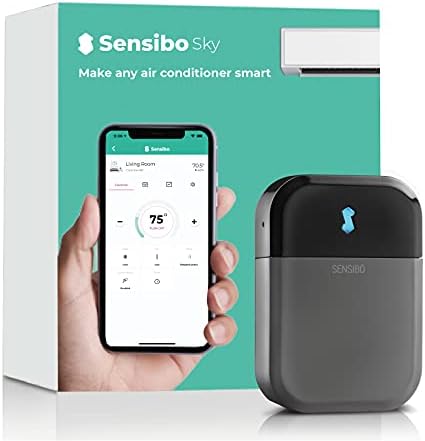
Sensibo Sky, Smart Wireless Air Conditioner Controller. Quick & Easy DIY Installation. Maintains Comfort with Energy Efficient. Automatic Wifi Thermostat Control App. Google, Alexa and Siri Compatible
Sensibo Sky, Smart Wireless Air Conditioner Controller. Quick & Easy DIY Installation. Maintains Comfort with Energy Efficient. Automatic Wifi Thermostat Control App. Google, Alexa and Siri Compatible
Regular price
$148.50 USD
Regular price
Sale price
$148.50 USD
Shipping calculated at checkout.
Quantity
Couldn't load pickup availability
About This
- SMART AC CONTROL - Turn your existing air conditioner or your mini split / ductless / heat pump system into a smart AC, reducing your cooling bills by up to 40%! The smartphone app allows you to take any remote controlled AC unit and have it maintain a comfortable home temperature from anywhere. This lightweight unit is only 3.2” X 2.2” X 0.8”, is wall mounted and comes in eco friendly packaging.
- EASY SETUP - Simply plug in your Sensibo Sky, connect to WiFi, launch the app, and enjoy a smarter, connected environment. Sensibo Sky connects with all remote controlled AC units in addition to smart home devices such as Google, Alexa, and Siri for use from your phone or desktop apps. Works with window AC, Mini Split/Ductless ACs or heat pumps and portable ACs.
- EASY TO USE - Sensibo Mobile (Android & iOS) and Web Apps for PC and Mac make it easy to control your home’s temperature from anywhere. Set unique temperature and humidity preferences for any room remotely or use the 7 days scheduler.
- BUY WITH CONFIDENCE - Sensibo, the smart air conditioner or window ACs controller company is a leader in home comfort. We work hard to ensure that all you need to do is define your comfort zone and our customer support team is always available, making sure you and your home are comfortable all year round.
Overview
- Brand : Sensibo
- Special Feature : Portable,Eco Friendly,Energy Efficient,Lightweight,Wifi
- Start year : 2018
- Seasonal Energy Efficiency Ratio (SEER) : 3.2
- Color : Gray
- Voltage : 140
- Noise Level : 1 Decibels
- Power Source : Corded Electric
- Form Factor : Portable
- 1. Download the Sensibo App from Google Play or the App Store
- 2. Connect the Sensibo device to power
- 3. Open the Sensibo app, create an account
- 4. Follow the instructions to
- Add and scan your device
- Set the location
- Choose a room
- 5. Select your Wi-Fi network and enter your password. Sensibo supports 2.4GHz Wi-Fi, not SGHz.
- Remote Pairing
- Pair your existing physical remote control with Sensibo. If the detected remote is not a perfect match or you don't have the physical remote, you can manually select the correct remote for your AC in the app.
- Device Placement
- Sensibo requires a direct line of sight with the AC unit you wish to operate. We recommend placing the Sensibo device within 5 meters/16 feet of the AC unit for best results. Older AC models may require placing the Sensibo device closer to the unit.
- Wi-Fi Connectivity: If you're having trouble connecting your device to Wi-Fi, you can manually connect it by following the steps found in "How to Install"
Share